

With wireless-first, cloud-dependent environments rising to prominence across industries, our Q1 2026 updates bring together deeper visibility, more precise control, and a new layer of cost awareness, giving MSPs and businesses more confidence in how their networks perform and how they scale.
Smarter Connectivity: Introducing Data Metering and Usage Control
Wireless and metered circuits are no longer edge cases, which is why our new circuit data metering capabilities are so useful.
Now available in Bigleaf Cloud Connect, this feature gives administrators the ability to manage any metered circuit, not just Bigleaf Wireless Connect circuits, with greater precision and confidence. You can now:
- Set per-circuit data caps
- Define monthly reset periods
- Automatically disable circuits before overage charges occur
- Receive alerts as usage approaches limits
But what makes this especially powerful isn’t just the controls, it’s the visibility.
Throughout Q1, Bigleaf introduced a series of enhancements leading up to this release:
- Real-time data usage visibility at both the circuit and site level
- Percentage-based usage tracking directly in dashboards
- Integrated views within circuit tables and overview cards
- Improved circuit configuration and management interfaces
Together, these updates transform how metered connectivity is used.
Instead of guessing or reacting after the fact, you can now act proactively, avoid costly surprises, balance performance with cost, and confidently incorporate wireless, satellite, and other metered circuits into your network strategy.
Greater Visibility and Control Across Your Network
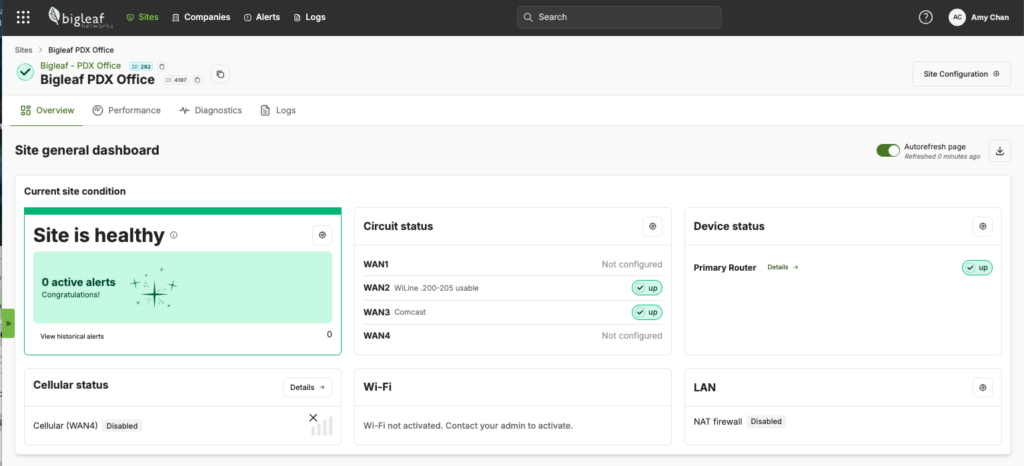
As environments grow more distributed, visibility becomes critical not just for troubleshooting, but for decision-making.
Q1 introduced several enhancements designed to make network insights easier to access and act on:
Performance Insights Where You Need Them
- Circuit usage settings now visible directly within the Performance view
- Data usage surfaced at a glance in Site Overview dashboard
- Clear indicators for circuit health and status
Faster Identification and Response
- Ability to filter sites by Primary Tunnel Endpoint
- Enhanced table views and filtering for faster navigation
- Improved clarity when identifying impacted sites during maintenance or events
Smarter Alerting and Awareness
- Continued rollout of risk-based alerting
- Improved notification logic tied to real-world conditions
The result is less time hunting for information and more time solving real problems.
Built for Wireless-First and Modern Deployment Needs
We continue to invest in making wireless a practical, reliable primary connectivity option.
In Q1, that included:
- Expanded wireless plan options, including new unlimited offerings
- Integrated data usage tracking for wireless circuits
- Continued enhancements to how wireless performance is surfaced and managed
These updates make it easier to:
- Deploy connectivity quickly (Day 1 scenarios)
- Support temporary or remote locations
- Extend reliable performance into underserved areas
Continuous Improvements That Make a Difference Every Day
Throughout the quarter, we also delivered a series of usability and control enhancements that improve day-to-day operations:
- Clearer circuit status indicators
- Streamlined configuration workflows
- Enhanced site-level control over device access (UI/CLI toggles)
- Ongoing performance and user experience improvements
These changes are designed to reduce friction, so managing your network feels simpler, faster, and more intuitive.
Firmware Enhancements: Strengthening the Foundation
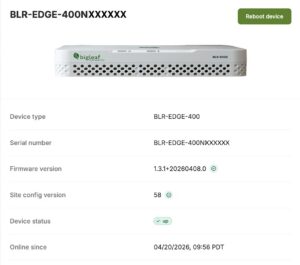
Alongside platform updates, recent firmware releases focused on improving stability, control, and operational flexibility.
The latest updates include:
- Expanded support for new platform capabilities and configuration controls
- Continued performance and reliability improvements across devices
- Ongoing enhancements to ensure consistent behavior across environments
While often operating behind the scenes, these updates play a critical role in delivering the consistent, high-quality experience Bigleaf is known for. Note that a device’s firmware version can be checked in the dashboard and manually upgraded following these instructions.
For the full information, please visit our Release Notes. For additional assistance, please visit our Help Center.